
Changelog
Follow OryoNex's journey of growth. Every update is a step towards a better experience.
Multi-Agent Tasks on the Way
The Planner agent, which splits work into sub-tasks, can now be picked straight from the new task form. Agent runs are more reliable, and a run that stopped can be restarted with one click.
Clearer Agent Tasks
When you create an agent task, the form now notices missing details for you, and every task can be read as one short summary. Quality checks behind the scenes were strengthened too.
Faster Assistant Responses
The assistant now confirms simple task actions instantly, and when several specialists work on one request, the answer is built directly from the information they gathered. The result: shorter waits and more consistent answers.
Faster Initial Load, Accessibility Improvements and Enterprise Quality Tightening
This release substantially speeds up the initial app load: the bundle dropped by more than half, and only your active language is now fetched at startup (previously both languages loaded). Screen-reader labels were added to the chat composer and the OKR weekly check-in form. On the server, configuration validation and error reporting are unified — if a critical environment variable is missing or a weak secret is detected, the service refuses to start with a clear error; when an error occurs at runtime, observability now receives properly tagged events. Challenge forms now require complete input.
OryoAgent ↔ OKR chat alignment + Admin monitoring page updated
Small release that aligns OryoAgent chat with OKR capabilities: 'Build OKRs', 'weekly check-in', 'risk scan' etc. now route to the correct OKR tool. Fixed a Turkish character rendering issue in suggestion chips. Post-response action suggestions are now OKR-aware. The platform admin 'Agent Monitoring' page lists all 5 OKR capabilities in active capabilities. When a workspace admin disables OKR, the related 5 quick-action buttons auto-hide in the OryoAgent sidebar.
OKR Team Empowerment — Private Goals, Director Dashboard, Enterprise Quality
This release brings the OKR feature to enterprise grade: private objective option (only owner + workspace admin sees), executive summary panel (donut chart + top 3 risk + top 3 progress), concurrent edit detection (conflict surfaces instantly), pending check-in indicator, key result dependency visualization in the cascade tree, workspace timezone for weekly reminders, draft period mode, period close button, edit/abandon objective. Multi-tab synchronization keeps all open tabs in sync. The OKR page is faster; clicking the 🎯 chip on a kanban card animates a jump to the related KR. Aligned with WCAG 2.2 AA, OWASP API Top 10, and SOC2 audit log requirements.
Run-Detail Panel, Smart Model Tier, Feedback-Driven Learning, and Second-Pass Review
This release strengthens OryoAgent across four core dimensions: run transparency, response quality, feedback loops, and pipeline resilience. The run-detail panel now surfaces token usage, retry counts, and the step timeline at a glance. A quality-first model tier kicks in automatically for high-stakes analyses (task analysis, risk scan, sprint planning, report generation). When a response misses the mark, you can now attach an 'ideal answer' note that feeds future improvements. The release pipeline has been hardened against external factors.
AEO/GEO Capabilities for AI Search Engines and Quick Action Tooltips
This release focuses on improving your visibility in AI search engines like ChatGPT, Perplexity, and AI Overviews. SEO capabilities are reinforced with a 14-dimension AEO/GEO audit framework; content generation now automatically produces TL;DR, FAQ, and author bio fields ready for AI citation. Structured data (JSON-LD) generation supports FAQPage and HowTo schemas. The Quick Actions panel now shows instant top-layer tooltips explaining what each button does.
Security Improvements and New Natural-Language Commands
This release tightens multi-tenant data isolation, adds an extra protection layer to the AI prompt pipeline, and ships 12 new natural-language commands — sprint planning, risk scanning, report generation, task analysis, and more — that route deterministically with zero LLM round-trips. A new background automation continuously verifies configuration consistency.
Performance, Accessibility, and Security Improvements
This release meaningfully speeds up AI response times, makes the kanban board faster to open and smoother to reorder, and makes dialogs more accessible for keyboard and screen-reader users. Background animations now respect your system motion preferences, the Turkish interface is fully consistent, and platform-wide security layers received quiet improvements.
Light-Theme Visibility Fixes and Sign-In Flow Polish
A broad visual pass fixed contrast and readability issues across light theme, the sign-in screen picked up a few handy touches, and landing on your workspaces right after logging in is now faster.
Security Hardening — Obfuscation Detection, Data Trust Boundaries, Audit Trail
OryoAgent's input protection now catches a wider range of disguised messages, treats all external content strictly as data, and logs every automated action for full transparency.
OryoAgent v5.0 — Smarter Planning and Unified Commands
OryoAgent now plans your tasks with greater precision and lets you combine multiple actions in a single command. Browser automation and task management work together seamlessly.
Three New Agent Quick Actions — Web Fetch, Workspace Files, Step-by-Step Reasoning
OryoAgent quick action panel now exposes three additional capabilities directly from the Analytics → Research section. Each one is available as a one-click button in the chat sidebar or through natural language in Turkish and English.
MCP Integration — Extend Your Agent with External Tools
OryoAgent can now connect to external tool servers using the Model Context Protocol (MCP) standard. Parse documents, fetch web pages, and build a knowledge graph — all from your agent chat. Workspace admins can add custom MCP servers for even more capabilities.
Chat History Search — Find Any Message Instantly
Full-text search across all your agent conversations. Type in the search bar and find any message by content — results are grouped by conversation with highlighted snippets. Click a result to jump directly to that message.
OryoAgent — Smarter Browser Automation & Performance Boost
OryoAgent's browser automation is now significantly faster and more accurate. Inspired by modern accessibility-first approaches, the AI now understands element states (open/closed menus, checked boxes, active tabs) and form labels — leading to fewer misclicks and smarter navigation. Performance improvements cut task completion time by up to 6x.
OryoAgent — Smart Memory: User Profile, Decision Log & Self-Improvement
OryoAgent now learns your preferences, remembers decisions, and improves itself weekly. Inspired by the latest AI agent research (Mem0, PersonaMem-v2, Reflexion pattern), this update adds three major intelligence layers that compound over time — the more you use OryoAgent, the smarter it gets.
Space Invaders — Gameplay & Reliability Update
Major gameplay improvements to Space Invaders with new scoring mechanics, visual effects, and critical stability fixes for the AI assistant.
Widget Dashboard — Settings, Weather & Quality Update
Widgets now have customizable settings. New weather widget with current conditions and 5-day forecast for 10 cities. All widget layouts redesigned, empty state indicators added across the board.
Widget Dashboard — Customizable Dashboard Panels
5 industry-specific presets, 30 drag-and-drop widgets, real-time data connections, and OryoAgent-powered widget management. Custom panels for e-commerce, developers, business management, marketing, and freelancers.
OryoAgent — Read Web Page Capability
OryoAgent can now read and extract content from any public web page. Just paste a URL and get clean, readable text — no browser automation needed.
Space Invaders — Performance & Gameplay Improvements
13 improvements for a smoother, fairer, and more performant Space Invaders experience. Dive attack game-over fixed, power-ups now preserved during pause, and mobile controls refined.
Space Invaders — Shield Stacking & Extra Life System
New power-up mechanics bring deeper strategy to Space Invaders: collect shields consecutively to stack extra firepower, pick up extra lives during boss fights, and enjoy an enhanced drop system.
AI Agent Capability Expansion — 13 New Tools + 11 Enhanced
OryoAgent now features 112 capabilities across 11 categories, adding product management, customer service, team operations, and marketing intelligence tools alongside major enhancements to existing e-commerce capabilities.
Space Invaders — Major Game Overhaul
A complete transformation of the Space Invaders mini-game with 5 unique boss encounters, 15 waves, new enemy types, advanced power-ups, and arcade-inspired mechanics from iconic shooters.
Smart Quick Actions Panel — Organized with Subcategories
The agent quick actions panel now groups capabilities into clear subcategories within each main category. E-Commerce's 38 actions are organized into 6 focused groups, Project Management into 4, and Analytics into 4 — making it easier to find the right tool at a glance.
X Content Creator — Security & Quality Hardening
Deep review and hardening of the X Content Creator capability with 26 fixes across security, prompt quality, output reliability, and user experience.
X Content Creator — AI-Powered Tweet & Thread Generation
OryoAgent now helps you create X (Twitter) content with 5 specialized modes. Generate tweets, build threads, improve existing posts, convert blog content, and craft strategic replies — all personalized to your voice through style DNA analysis.
Space Invaders — New Game in Game Center
Space Invaders has been added to the Game Center. A classic arcade experience with 10 waves, 4 enemy types, boss fights, power-ups, and a barrier system. Each game now has its own leaderboard with a game selector.
GEO & Site Audit — Real Page Analysis
GEO Report and Site Audit now fetch and analyze actual page content. When server access is blocked, automatic local browser fallback via MacBook kicks in.
E-Commerce Operations Assistant
OryoAgent now automates daily e-commerce operations. 12 new capabilities added including stock tracking, price research, content quality checks, and campaign validation.
Google Services Integration
Connect all Google APIs with a single service account. OryoAgent now analyzes and reports using real data.
AI Security Hardening
Strengthened AI chat defenses with multilingual protection, smarter input analysis, and extended coverage for all user-generated content.
Workspace Intelligence & Agent Reliability
Smarter workspace context for AI, per-capability daily usage limits, improved multi-agent response quality, and enhanced admin monitoring with trend charts.
SEO & Operations Suite
Five new AI-powered capabilities for SEO content planning, site auditing, vendor management, ad budget monitoring, and app store tracking.
Team Management Intelligence
Three new cross-workspace team management capabilities for workload analysis, workflow optimization, and overdue task tracking.
Security Hardening
Comprehensive security review and hardening across the platform. Strengthened input validation, authentication mechanisms, and cross-origin protections.
Gantt Chart, List View, Custom Fields & Dependencies
A fully interactive Gantt chart for timeline planning, a sortable list view with all task fields, custom fields to track data unique to your workflow, and task dependencies with circular dependency protection. Plus a new start date field for accurate scheduling.
Workspace Templates & Multi-Model AI
Ten ready-to-use workspace templates for common e-commerce and project workflows, plus a multi-model AI provider system that lets you connect Claude, OpenAI, or Gemini as your AI backend with automatic failover.
Daily Standup Summary & Capability Engineering
A new AI-powered Daily Standup capability that scans the entire workspace and generates a ready-to-use standup report — completed tasks, in-progress work, blockers, and today's priorities. Plus an expanded capability creation standard ensuring every new agent feature ships with full coverage across all system layers.
Agentic Engineering — Spec-First Planning & Code Review
Four capabilities mapped from Karpathy's Agentic Engineering principles: a spec-first task planner that turns vague goals into structured specs and atomic kanban cards; a GitHub PR code reviewer covering security, architecture, and missing tests; a conversation health indicator that warns before context collapse; and a cognitive debt dashboard that tracks failure rates, reruns, and long conversations with a 0–100 efficiency score.
Memory Insights & Performance Deep-Dive
The Memory tab now shows a live layer breakdown at a glance — click any badge to instantly filter by that layer. Memories with an expiry date display a countdown indicator that turns amber as the date approaches and red when expiry is imminent. The Performance tab gains an efficiency score (credits spent per successful run) on each capability card, plus an expandable top-tools panel that reveals which tools a capability relied on most during the selected period.
Automation — Custom Agent Schedules
Agents can now run on a schedule you define. Choose from built-in presets (daily morning, daily evening, every Monday, every Friday, every 3 hours) or enter a custom schedule expression. Active schedules are listed with their next run time and can be deleted at any time. A new notification modal surfaces important agent alerts inline so you never miss a status change.
Quick Action UX Overhaul & Agent Documentation
Every quick action button now has a dedicated, context-aware input dialog — no more generic prompts. Each button asks exactly the right question before running. Disabled legacy server-side browser tools have been removed from the interface, replaced fully by the Mac-native browser controls. Comprehensive agent capability documentation added covering all 61 capabilities.
GEO Analysis — AI Search Visibility
New GEO (Generative Engine Optimization) report to analyze your website's visibility in AI search engines like ChatGPT, Perplexity, Google AI Overviews, and Claude. Discover how to become more visible in AI searches with content structure, citation-worthiness, and technical readiness scores.
Reliability & Performance Hardening
Comprehensive reliability hardening across the entire agent platform. Scheduled tasks are now more resilient with better resource management and duplicate prevention. Agent performance analytics load faster with smarter data processing. Overall system stability improved with better error recovery and resource cleanup.
MacBook Smart Actions & Task Quick Actions
Your AI assistant now understands more specific requests for your MacBook and your workspace. New dedicated quick actions for calendar, reminders, notes, contacts, music control, system settings, and email sending. Plus, previously advanced task actions like assigning, moving, and setting priorities are now available as one-tap quick actions.
Performance & Stability Deep Dive
End-to-end performance optimization and stability hardening across the entire agent system. Smoother real-time streaming, faster conversation loading, and elimination of multiple race conditions that could cause stale data or UI glitches during rapid interactions.
Platform Optimization & Infrastructure
Comprehensive platform improvements covering performance, accessibility, security, monitoring, and architecture. API response times reduced, dashboard monitoring expanded, and accessibility standards raised to WCAG 2.1 AA.
Response Reliability & PWA Update
Agent responses are now significantly more reliable. Dashboard data extraction is faster with a new direct-read approach. Duplicate message display has been resolved. The PWA update detection system has been improved for quicker notifications.
Form Typing Reliability & Dashboard Data Extraction
Browser automation form typing is now significantly more reliable. A critical bug causing every character to be typed twice on certain e-commerce platforms has been resolved. Dashboard metric reading and reporting has been improved. The new conversation button now works with a single click.
Stability & Performance
Under-the-hood improvements to browser automation stability and overall performance. Error recovery is more robust and resource usage has been optimized.
Smart Screenshot Optimization
The vision system now intelligently skips unnecessary screenshots, reducing processing time and API costs. Conversation history is compressed to use less memory.
Turkish Web Pattern Support
Enhanced support for Turkish websites with locale-aware patterns. Cookie consent dialogs are now handled more reliably across different platforms.
E-Commerce Panel Integration
Expanded support for e-commerce administration panels. The agent can now extract structured data from dashboards and return it in organized format. Form filling reliability has been improved.
Smarter Visual Marking & Screenshot Accuracy
Visual element marking is now significantly more accurate. Labels no longer overlap in dense navigation areas, modal and dialog content is prioritized, and screenshots now precisely match interaction coordinates on all display types.
Stability & Reliability Improvements
Under-the-hood improvements to browser automation stability. File operations are now fully asynchronous, temporary files use unique names to prevent conflicts, and several edge cases in page navigation have been resolved.
Browser Navigation & Memory Optimization
Browser automation is now significantly more capable with back navigation, keyboard shortcuts, and intelligent memory management. The agent can recover from wrong pages by going back, use Ctrl/Cmd shortcuts for form operations, and optimize memory usage during long browsing sessions.
Visual Marking System & Error Recovery
Browser automation now marks clickable elements on the page with numbered labels for much more accurate clicking. Automatic recovery from temporary errors makes the agent more resilient and reliable.
Offline Experience & PWA Enhancements
Major improvements to offline reliability and Progressive Web App capabilities. Failed actions while offline are now automatically queued and replayed when you reconnect. The app now remembers your active conversation, supports bilingual offline pages, and includes stronger browser security headers.
Infrastructure & Security Hardening
Comprehensive code review and hardening across the entire stack. Security vulnerabilities patched, database queries optimized with intelligent caching, deployment pipeline strengthened with automated health checks and container security. Every API response now includes a version identifier for easier debugging.
Smarter Agent Persistence — No More Early Exits
The browser agent no longer gives up prematurely on challenging pages. When confidence is low, the agent now continues exploring instead of immediately declaring failure. The first few steps are always protected, ensuring the agent tries before deciding.
Full-Screen Browsing & Faster Navigation
The browser now opens in full-screen mode, making menu bars and navigation elements fully visible. Mouse movement is optimized for speed, the correct tab is always selected, and task completion is detected faster when the target page is reached.
Visual Page Change Detection
Browser automation now compares consecutive screenshots to detect whether a page actually changed after an action. This zero-cost visual comparison gives the AI concrete feedback about the effect of each click and scroll.
Improved Menu & Subcategory Navigation
The browser agent now correctly navigates hierarchical menus by hovering parent items before clicking subcategories. This fixes cases where clicking a top-level category led to a wrong page instead of revealing the desired subcategory.
Smarter Waiting & Anti-Detection — Post-Action Intelligence
Browser automation now waits for network activity to settle after clicks and navigation, ensuring pages are fully loaded before the next step. The agent is aware of viewport dimensions for more accurate interactions. Tab management prevents memory issues during long sessions.
Reliable Tab Tracking & Subcategory Navigation
Browser tabs are now reliably tracked even after navigation. The agent understands hierarchical menus and correctly navigates to subcategories by hovering parent items first. A cancel button lets you stop the agent mid-task.
Reliable Navigation — Verify Before Done
Browser navigation commands are now verified before being marked as complete. The agent takes an extra screenshot after page-changing actions to confirm the page actually navigated, preventing premature task completion. Context-aware intent routing ensures follow-up commands are correctly understood.
Smarter Browsing — Action Batching, Hover, Dropdown & Self-Correction
Browser automation is now significantly faster and smarter. Multiple simple actions can be executed in a single step without intermediate screenshots. Hover interactions reveal hidden menus and tooltips. Dropdown selections are handled natively. The system automatically detects loading states and validates that actions had an effect.
Connection Stability & Screenshot Display
Browser automation connections are now more stable during long sessions with large screenshots. The active page is detected automatically, and browser screenshots are displayed directly in the chat for better visibility.
Drag & Drop and File Upload Support
Browser automation now supports drag-and-drop interactions and file uploads. Drag actions follow natural Bezier movement paths for realistic behavior. File uploads are protected by multi-layer security validation.
Smart Page Detection and Task Chaining
Browser automation now automatically detects interactive elements (buttons, links, forms) on pages for more accurate clicking. When multiple browser tasks run sequentially, session state is automatically transferred between them.
Human-Like Browser Control — Natural and Intelligent Automation
Browser automation now behaves like a real user. Natural mouse movements, smooth scrolling, realistic typing rhythm, and advanced page-wait strategies deliver much more reliable results.
Security & Infrastructure Improvements — Stronger Foundation
Over 60 security and quality improvements applied after a comprehensive security audit. Agent infrastructure modularized and automated test coverage significantly expanded.
Enhanced Notification & Cookie Management — Seamless Browser Experience
Notification permission prompts and cookie banners shown by websites during browser automation are now dismissed much more reliably.
Smart Browser Automation — AI-Powered Web Control
OryoAgent can now control your connected MacBook's browser using AI-powered vision analysis. It takes screenshots, analyzes the page, and performs human-like step-by-step automation.
Multi-Agent Orchestration — Specialist Teams for Complex Requests
OryoAgent can now coordinate multiple specialist agents to handle complex, cross-domain requests in parallel.
AI Context Intelligence — Smarter Agent Interactions
New tools for context visibility, quick command access, smarter resource management, and enhanced safety controls for high-risk operations.
Infrastructure Hardening — Performance & Monitoring Fixes
Server-side improvements focused on monitoring reliability, security event tracking, and overall system performance. Resolved resource leaks and fixed broken metrics collection.
Agent Tool Calling — Root Cause Fix for Empty Parameters
Critical fix for a structural issue that caused OryoAgent to send empty parameters when executing tools like opening apps on MacBook, navigating websites, and running commands. The agent now reliably fills all required parameters.
Agent Intelligence — Smarter Tool Execution & Error Recovery
Major reliability improvements to OryoAgent's tool execution pipeline. The agent now understands tool parameters better, recovers from errors more gracefully, and avoids getting stuck in repetitive loops.
Accessibility & Code Quality — Full Compliance Pass
Comprehensive accessibility improvements across all agent components and a complete code quality sweep eliminating all frontend lint warnings.
Device Ownership & Screenshot Rendering — Stability & Security Fixes
Devices are now strictly user-owned and accessible from any workspace. Screenshots captured by the agent are rendered as images instead of raw data. Multiple agent execution engine fixes improve reliability.
MacBook Local Device Management — OryoAgent Can Now Control Your Mac
OryoAgent can now securely connect to your local MacBook and automate it — run terminal commands, read and write files, control apps via AppleScript, take screenshots, and read emails. Works over a secure reverse-connection so no port forwarding is needed.
Agent Hardening — Human Approval Toggle, Reliability & Security Improvements
Major reliability and security update across the agent system. Introduces a user-controlled supervised mode toggle, persistent failed-operation recovery, and multiple platform-level protections.
Security Remediation — SQLite Cleanup, Email Hardcoding & Non-Root Nginx
Resolved 3 critical findings from the deep-dive re-scan: deleted local SQLite database artifacts containing PII, replaced hardcoded admin email with environment variable, and fixed Nginx to run on unprivileged port 8080 as non-root user.
Queue Engine Security Audit — 7 Critical Fixes
Deep-dive audit identified and fixed IDOR vulnerabilities, WebSocket data leakage, non-functional queue modes, and missing input validation across the agent queue system. 19 new unit tests added.
OryoAgent — Human Approval Flow, Queue Engine & Model Failover
OryoAgent now requests human approval for critical operations, intelligently queues concurrent messages, and automatically falls back to backup AI models on failure. All decisions are observable via Prometheus metrics.
OryoAgent — Integration-Powered Analytics & Strategic Analysis (5 New Tools)
5 new AI-powered tools: SEO reports via Search Console, traffic analytics via GA4, XML feed sync, competitor price analysis, and campaign suggestions. Full integration awareness system added.
Security Audit Remediation — Workspace Isolation & Platform Hardening
9 fixes based on comprehensive security audit findings. File upload workspace isolation, server-side session revocation, invitation token masking, Prometheus HTTP metrics, and 16 new security contract tests.
OryoAgent Prompt Engineering — Structured Prompt System
All OryoAgent LLM call points have been restructured according to Gemini prompt engineering best practices. Structured XML templates, few-shot examples, self-critique system, and anti-hallucination safeguards deliver more accurate and reliable agent responses.
OryoAgent E-Commerce Tools — Product Management & Sales Analytics
OryoAgent now manages your e-commerce operations. Create products, search your catalog, generate SEO-optimized listings, update orders, and analyze sales — all through natural conversation or quick actions.
OryoAgent Task Editing — Comments, Subtask Management, and More
OryoAgent can now fully edit your tasks without spending any credits. Add comments, update titles and descriptions, create subtasks, toggle completion status, and manage labels — all through natural conversation.
Production Polish & Deployment Improvements
Final pre-deployment review and cleanup pass. Improved logging consistency across the agent system and removed unused configuration from the build pipeline.
Performance Testing & Production Hardening
Comprehensive load testing infrastructure ensures OryoAgent performs reliably under real-world conditions. Detailed monitoring dashboards provide full visibility into system health during peak usage.
OryoAgent Advanced Intelligence — Smart Reports, Workflow Insights & Resilience
OryoAgent gains powerful new analytical capabilities with four advanced AI tools, plus enhanced reliability with automatic failover, hybrid search, and a plugin system for extensibility.
OryoAgent Proactive Automation — Scheduled Tasks and Smart Alerts
OryoAgent now works for you even when you're not around. Automated schedules monitor your workspace, detect overdue or stale tasks, create daily digests, and provide sprint health insights — all proactively.
OryoAgent Persistent Memory and Daily Digest System
OryoAgent now remembers what it learns across conversations. Your preferences, work patterns, and project knowledge are securely stored to provide personalized, context-aware responses in every new conversation.
OryoAgent Direct Actions — 8 New Capabilities Without Credits
OryoAgent can now directly assign tasks, move them between columns, change priorities, set deadlines, attach labels, search tasks, view workspace metrics, and send notifications — all without using any credits.
OryoAgent Streaming Responses and Smarter Resource Usage
OryoAgent now streams responses in real time as they are generated. Behind the scenes, intelligent resource management ensures faster and more efficient operations.
OryoAgent Recipe System — Save and Rerun Repeated Workflows
OryoAgent now lets you save frequently used workflow steps as recipes. Saved recipes can be rerun with a single click, saving both credits and time.
OryoAgent v3 — Multi-Step Intelligent Execution Loop
OryoAgent now handles complex tasks step by step — planning, executing and verifying each action. The new architecture delivers more reliable results with detailed progress tracking.
OryoAgent Smart Conversations — Suggestions, Feedback and Deep Links
OryoAgent now suggests your next steps after every response, lets you jump directly to created tasks, and allows you to provide feedback on response quality.
OryoAgent Natural Chat — Workspace Task Awareness
OryoAgent can now see your workspace tasks. Ask questions in natural language about column-based task lists, priorities, assignments and overdue items.
Comprehensive Bug Audit and Security Fixes
Comprehensive code scan performed. Security vulnerabilities, performance issues, API mismatches and Service Worker errors fixed.
OryoAgent Super Admin Monitoring Dashboard
Agent monitoring, architecture visualization and security event panel added for platform admins.
OryoAgent UX Improvements and Quick Action Fixes
Markdown rendering for agent messages, metadata badge fix, quick action UX improvements, and capability context filtering added.
OryoAgent Security v5 - Deep Dive Scan Fixes
Multiple findings fixed based on comprehensive security scan. Unicode defense, output sanitization, access control fix, and AI safety settings added.
OryoAgent Error Masking & Log Security
Agent endpoint error messages sanitized, AI error details hidden from users, and sensitive information redacted in security logs.
OryoAgent Security v4 - Full OWASP Compliance
Comprehensive security update based on OWASP standards. Text manipulation, output protection, and sensitive information leak defenses added.
OryoAgent Advanced Security v3
Comprehensive security update based on OWASP standards. Advanced attack detection, suspicious activity tracking, and AI output limits added.
OryoAgent Security Hardening
Comprehensive security layer added for OryoAgent. Prompt injection detection, system instruction protection, output sanitization, and audit logging make your AI assistant more secure than ever.
OryoAgent - AI Assistant System
Interact with OryoAgent using natural language. Perform task analysis, subtask generation, risk scanning, and sprint planning powered by AI.
Security, SEO & Task Modal Redesign
Production console security hardened, SEO infrastructure improved, and Attachments, Subtasks, and Comments sections in the task edit modal modernized.
Drag & Drop Performance Fix
Fixed lag and unwanted scrolling issues when dragging tasks on the Kanban board.
In-App Notification Center
Stay on top of your workspace activity with the new notification center. See comments, task updates, and more — grouped by date, clickable to open the related task instantly.
Drag & Drop File Upload
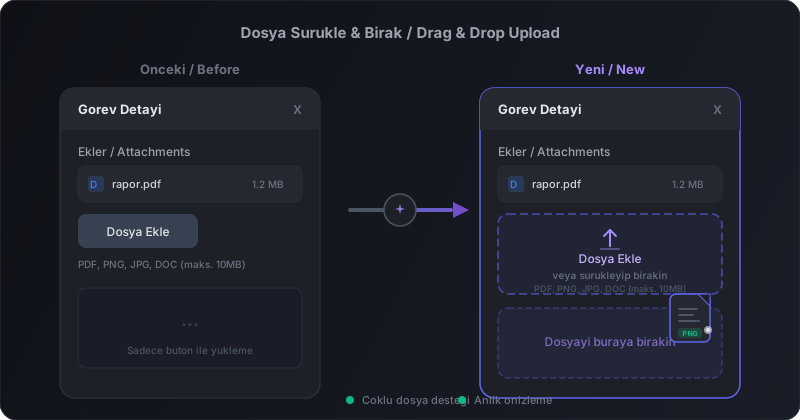
Upload files to task attachments by simply dragging and dropping. Multi-file support and instant visual feedback make file uploads much faster.
PWA & Settings Panel Improvements
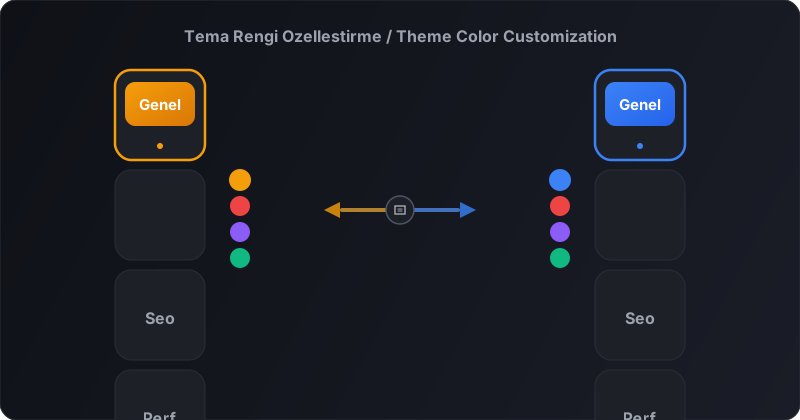
All members can now access the Settings panel. Customize theme color, font, and display preferences. PWA infrastructure strengthened.
@Mention User Tagging
Tag workspace members in task comments using @ and send them instant notifications.
Server-Side Notification Tracking
Unseen task notifications on the Kanban board are now tracked server-side. Cross-device sync and persistent state support.
SEO & Performance Improvements
Major improvements in search engine optimization and page load performance.
Email Verification & Admin Panel
Email verification system for account security and admin panel improvements.
Chat Encryption Indicator
Added encryption indicator so users can see their messages are secure.
Score Visibility & Contact Form
User score visibility settings and new contact form.
Asteroid Dodge Game Module
New Asteroid Dodge game added to the gamification system. Weekly leaderboard and mobile support.
Beta Period & FAQ Update
Transition to beta period with pricing and FAQ updates.
Notification System & Mobile Menu
Push notification infrastructure and mobile hamburger menu added.
Real-Time Chat System
Real-time chat system with encrypted messaging added.
Account Deletion — Workspace Handling
Account deletion now properly handles workspace ownership. Single-member workspaces are deleted, multi-member workspaces transfer ownership to the next admin.
Internationalization & SEO Improvements
Full i18n support for Turkish and English, comprehensive FAQ sections, AI Authority Checklist, and structured data for SEO.
Mobile Responsiveness & SEO
SEO/GEO improvements for marketing pages, mobile responsiveness for admin components, and notification badge improvements.
Initial Release - AI-Powered Kanban
First release of OryoNex: AI-powered Kanban project management.